2025 SNESDEV Game Jam Postmortem: The engine
In 2025 there was a SNESDEV game jam which amazingly received 18 submissions. My submission (with KungFuFurby generously creating the game's wonderful music) was a small 3 level platformer called Space Rescue Squad that won 4th place.

I intend to continue work on Space Rescue Squad and turn it into a complete game with more levels, more enemies and significantly better graphics and effects.
This blog post started as a postmortem about the game but quickly morphed into a high level overview of the various subsystems and a retrospective of the game engine. The upcoming part 2 will cover the game jam and the game itself.
Space Rescue Squad can be downloaded from itch.io and can be played on an NTSC Super Nintendo console or SNES emulator.
The source code was published to GitHub with zlib/MIT licensed code and source available game resources (not to be used in other projects).
Spoiler warning: This blog post contains Space Rescue Squad development screenshots and descriptions of gameplay elements.
untech-engine
In 2015 I tried the one game a month challenge and created 11 small soundless SNES homebrew mini-games over 12 months. In 2016 I started a SNES homebrew platformer game engine with a fancy editor and an overly complicated design. This was a mistake for three reasons:
-
It was an engine with no game. I did make a small horizontal-shooter demo to test out the metasprite collisions and entity loop, however it does not even cover half of my engine's features, like tiles and tile collisions, so it doesn't really count.
-
The various subsystems got horribly intertwined and changing low-level stuff was difficult. I ran into an annoying jitter issue with how dynamic sprite tiles are loaded into VRAM and couldn't come up with a good way to fix it without ripping out or changing a lot of the engine.
-
I was more interested in rewriting the editor than improving the engine.
In 2021 a SNESDEV Game Jam was announced with the theme of perspectives. I could not think of a way to incorporate the theme into my engine, so I put the untech-engine away and decided to build a short top-down game from scratch. I was way too ambitious and was unable to complete the jam but continued to use the code to build a small Zelda-like demo that was released at the end of 2022.
The 2025 SNESDEV Game Jam was the perfect excuse to revive untech-engine and finally make a game with it.
untech-engine and unnamed-snes-game are near total opposites.
| untech-engine | unnamed-snes-game | |
|---|---|---|
| Code | bass v14 65816 assembly | wiz (a medium-level language) |
| Code layout | spaghetti | aliased mess of circular imports |
| Calling convention | a16, i16 DP = 0 or entity pointer or $2100 or $4300 |
a8, i8 DP = 0 |
| Entity data | Array of Structures | Structure of Word Arrays |
| Entity register | 16 bit Direct Page | 8 bit X |
| Entity management | Multiple linked lists | Single array of indexes |
| Entity spawning | A complicated multi-frame mess that involves multiple lists and uploading sprite tiles during VBlank | Instantly allocated by incrementing an array index |
| Entity movement | Unsigned 24 bit + u8 movement-state direction bits | Signed 16 bit velocity |
| Metasprite | Frames are a list of objects | Metasprite patterns (shapes) are drawn with 65816 code |
| Metasprite tiles | Dynamic. Sprite tiles allocated when the entity is activated |
Static (with dynamic player tiles). Sprite tiles uploaded when the dungeon is loaded |
| Metasprite palettes | Dynamic | Static |
| Metasprite drawing | Entities are drawn in their Process function |
All entities are processed, sorted, then drawn |
| Metasprite draw order | Front to back | Back to front |
| OAM hi table | Populated after all sprites are drawn | rol bit buffer |
| Projectile spawning | Metasprite action points | Hard coded in the entity's Process function |
| Entity collisions | All entities collisions are checked at once, a collision invokes a callback | Collision manually invoked in the entity's Process function |
| Map format | 2 different map heights (64 & 128 tiles) in column major order | Fixed map size in row major order |
| Tile collisions | Angled tiles and platform tiles | (currently) Solid tiles only |
| Room events | Bytecode scripts | 65816 code and function table indexes |
| Animated tiles | Yes | (currently) No |
| Palette cycling | Yes | (currently) No |
| Resource compiler | Custom C++ code in external repo | python script in external repo |
| Level and sprite editor | Custom C++ Dear ImGui GUI in external repo | Tiled map editor + python tkinter scripts in repo |
| VBlank time | Tracked | Untracked |
| Compression | LZ4 | none |
| Data formats | XML | JSON |
| Compiling | Compile resources (binary + asm output) then assemble ROM | Generate code from JSON files, compile code, then compile resources |
| Temporarily abandoned to work on a 2021 SNES game jam | Temporarily abandoned to work on a 2025 SNES game jam |
I think the only things that are similar are the:
- Metasprite animation design
- The map data is 8 bits per tile
- Entity spawn parameter byte
- The entity
Processfunction state machine design - Both games use my Terrific Audio Driver
Engine features
Working with an existing game engine greatly speed up the development of Space Rescue Squad. I would not have made the game jam's deadline without it.
Most engine features worked perfectly:
- Entity ROM data
- Entity movement
- Unsigned entity movement variables
- Palette animations
- Room scripting bytecode
- Gamestate (a system to manage game variables that persist across levels and used in bytecode scripts)
- Metasprites (entity/actor sprites drawn using many smaller sprites)
- VRAM management
- Animations
- Entity-entity collisions
- Metatiles (room tiles)
- Scrolling
- Metatile animations
- Interactive tiles (tiles that modify an entity or start a bytecode script)
- Crumbing tiles (tiles that can disappear when stood on and optionally reappear later)
- Scenes (graphics layouts and effects) data structures and callbacks
- Resource management
- LZ4 decompression
- A basic fixed-width text console
- BSOD break interrupt handler
Other features worked nicely after fixing a few minor bugs:
- Automatic VRAM layouts
- Room loading
- Tiles that interact with players and entities
The following features have issues, but are usable:
- Vertical Blank DMA time management
- Metasprite animations
- Entity-Tile collisions
The following features were incomplete, but usable:
- Camera (currently, the player is stuck in the middle of the screen)
The following features were not used:
- HDMA effects
- Entity instance id (an id for every room entity intended for bytecode scripting or multipart bosses, not fully implemented)
- Metasprite tile/palette unloading and reloading functions. (Intended for a full-screen menu screen, not fully implemented.)
- Bytecode conditional and loop statements
- Entity counting functions
- 32 bit multiplication
- 16 bit / 16 bit division
- 32 bit / 32 bit division
While one of my goals for the game jam was to minimise changes to the engine, I did find myself adding one new features to the engine - A gravity table to entity movement. Entities can set their gravity table index to control how floaty they are and can change their gravity acceleration & max y-axis momentum when underwater or jumping.
movementState
One thing that surprised me was how useful unsigned momentum was.
In untech-engine, each entity has 2x 32-bit UQ16.16 unsigned fixed-point
variables for their position and 2x 24-bit UQ8.16 unsigned fixed point
variables for their momentum. The direction of the momentum is controlled by a
movementState variables, it also contains flags that manage the entity's tile
collision state.
7  bit  0
---- ----
cx.n sygf
|| | ||||
|| | |||+- Facing direction (0 = left, 1 = right)
|| | ||+-- Gravity direction (0 = down, 1 = up)
|| | |+--- Y-axis direction (0 = up, 1 = down)
|| | +---- Standing flag
|| +------ No-gravity flag
|+-------- X-axis direction (0 = left, 1 = right)
+--------- X-axis collision (set if there was a tile collision in the x-axis)
movementState was originally an experiment to see if unsigned momentum would
simplify the movement code and it did by eliminating or simplifying a lot of
signed comparisons. In the MoveEntity and MoveEntityAndProcessTileCollisions
subroutines movementState optimises Y-axis movement by turning multiple
if-chains that select between 8 or 9 code paths into a jump table.
Unsigned momentum also eliminated the need to negate the X-axis or Y-axis velocity when the entity is moving up and/or left. Separate flags for the facing direction and the x-axis movement direction allowed me to easily code a decelerate-and-turn movement code without worrying about signed comparisons.
movementState is used to select the entity's animation frame. If I
arrange each distinct animations in a left, right, left-up-gravity and
right-up-gravity order, the direction animation can be selected with logical
operations, i.e. walk_left | (movementState & 3).
Entity loop
The entity loop is a workable mess of linked lists and control-flow gotos. I chose linked lists because elements can be quickly and easily moved across multiple lists.
I have 3 special entity lists:
freeholds the unallocated entitiesactivateNextFrameholds the entities are awaiting activation.- All newly spawned entities start in this list.
- Before an entity can be activated its sprite tiles and palette need to be uploaded to the PPU.
- Since VBlank time (the only time I can write to VRAM) is limited, it is not possible to activate every entity in a single frame.
- An entity might spend multiple frames inside this list.
deactivatedholds the entities that are offscreen and deactivateddeactivatedentities will not be processed.- Entities in the
deactivatedlist will be moved into theactivateNextFramelist when they enter the active window (lying just beyond the screen boundary).
After the entity lists there are the game specific entity lists. The editor's project file can define as many entity lists as I need and they are used to manage both the process (draw) order and collision interactions.
Space Rescue Squad has the following lists (listed in draw order front -> back):
- Particles (no collision)
- Player projectiles (collision with the enemies list)
- Enemy projectiles (collision with the player)
- Enemies (collision with the player)
All entity-entity collisions are tested in one go before any of the entities
are processed. The collision box testing and logic are hard coded into the
engine. Each entity has a Metasprite frame and that frame can have a hit-box,
hurt-box and/or a shield-box. When there is an entity/entity collision, it
will invoke a HitboxCollision, HurtboxCollison or ShieldCollision
callback inside the entity code.
After the collision tests, the entities are processed. This is where the
spaghetti code begins. The entity's Process subroutine is called, but
instead of returning, the Process function jumps to one of many
@EndEntityProcess tagged routines:
GotoNextEntityDrawAndGotoNextEntityDeleteAndGotoNextEntityDeleteIfOutsideAndGotoNextEntityDeleteIfOutsideOrDrawAndGotoNextEntityDeactivateAndGotoNextEntityDeactivateIfOutsideAndGotoNextEntityDeactivateIfOutsideOrDrawAndGotoNextEntityDeleteIfAnimationEndsOrDrawAndGotoNextEntityDrawAndChangeEntityListIdAndGotoNextEntityChangeEntityListIdAndGotoNextEntity
Originally the Process function returned with an rts and the offscreen
entity behaviour, entity rendering and entity deletion were controlled by the
list the entity is in but that quickly became inefficient and was unnecessarily
complicated. When I saw how cosmicchipsocket's
Superfeather SNES Game Engine
used a
macro to jump to the next object's objThinker callback
(instead of having objThinker return) I got inspired to do something similar.
Over time it evolved into the 11 different @EndEntityProcess routines I use
today.
While this does look confusing it handles my use cases well.
Metasprites
A metasprite is a common term for a drawing a single entity using multiple hardware sprites. In the engine, the metasprite subsystem is also responsible for managing sprite tiles in VRAM, sprite palettes, collision boxes and animations.
The Metasprite subsystem is something I'm both proud of and frustrated with. On one hand, it manages VRAM and palettes perfectly and uses a neat method of avoid signed numbers. On the other hand, I do not like how it handles dynamic sprite tiles (metasprites that upload tiles to VRAM whenever their metasprite frame changes).
Creating metasprites in the editor
Creating a new entity starts with the metasprite export order. This creates a
common mapping for metasprite still frames and animations between the resource
compiler and the 65816 assembly code. It is separate from the metasprite
frameset data to allow the entity code to be reused across different
metasprites. The metasprite compiler supports automatic frame/animation
flipping - if the frame or animation is not defined, it will search through the
alt list and automatically generate a flipped metasprite frame. (For example,
the player has no standing_left frame and it is automatically generated by
horizontally flipping the standing_right frame).

All sprite tiles in Space Rescue Squad are extracted from PNG images (created using Aseprite). However, the process is not fully automatic. I must manually place the 16px and 8px objects inside each frame.
The object positions can be edited by clicking and dragging with the mouse in the editor GUI or by manually editing the object table in the sidebar (not shown in this screenshot).

The grey cross in each frame is the metasprite's origin (entity position) point.
The collision boxes and action-point layers are not shown.
The palette for the metasprites can be automatically generated or it can be included in the source PNG image. User supplied palettes allow for palette reuse (all 3 fireball metasprites use the same palette) and provides a way for a metasprite to use multiple palettes (used by the player and the cleaning bot).


Then I define the collision boxes. Each metasprite frame has an optional shield (orange in the editor), entity hit-box (red) and entity hurt-box (blue). The collision box behaviour is hard-coded into the engine for speed purposes.
Every metasprite frame currently has an optional tile hit-box, however I've found this is not ideal and will be changing it in the near future.

The boxes can be edited by clicking and drag the box with the mouse or by manually entering in values in the right sidebar.

Metasprite frames can have action points attached to them. Whenever the frame is changed, a callback will be executed at the action point's position.
Currently Space Rescue Squad has 2 actions point types, PlayerProjectile and
EnemyProjectile, which both spawn a projectile (defined in the entity ROM
data). This ties projectile spawning to metasprite animation and ensures the
projectile is launched after the attack animation's anticipation frames.
In the future I intend to add landing and stomping action points that will spawn a puff of dust and play a sound effect and attach them to the feet of the large enemies.

EnemyProjectile action point at the boss's mouth on the boss's 4th attack frame.Attack frames 1 - 3 are anticipation frames that raise the boss's head, so the player can prepare for the attack before the fireball projectile is launched.
Finally, metasprites have animations. There 4 different formats for animation's duration field:
- FRAME - Number of display frames to wait to wait.
- TIME - Number of 75Hz ticks to wait (intended for equal-ish timing on PAL and NTSC consoles).
- DISTANCE_VERTICAL - Vertical distance the player must move before the next frame. Ties the animation to the entity's falling/rising speed.
- DISTANCE_HORIZONTAL - Horizontal distance the player must move before the next frame. Ties the animation to the entity's x-axis momentum.
Animations can end in one of 3 different ways:
- Looping. Repeats the animation over and over again.
- Have a next animation set. The animation plays once then changes.
For example, the fish's
turn_rightanimation will then play the loopingrightanimation. - One shot. Animation does not loop. The entity code typically waits until the animation has completed before advancing to the next state.

Avoiding signed numbers
None of the metasprite data-formats use signed numbers. Instead, the sprite offsets and entity collision box positions are stored as an 8-bit excess-128 biased integer to avoid 8 to 16 bit signed promotion comparison.
Room positions are also unsigned by moving the room's origin to (0x1000, 0x1000).
When drawing the sprites, the entity must first convert the entity's room position to a biased screen position:
MetaSprite.Render.xPos = entity->xPos.px - INT_MS8_OFFSET - Camera.xPos;
MetaSprite.Render.yPos = entity->yPos.px - INT_MS8_OFFSET - Camera.yPos;
RenderEntityFrameAndPos()
Entity collision testing does not require a INT_MS8_OFFSET subtraction nor
signed comparison as all entity collision boxes have the same INT_MS8_OFFSET +
ROOM_ORIGIN bias. To optimise collision testing an outer box that contains
the hit-box, hurt-box and shield-box is tested before the hit-box/hurt-box,
hit-box/shield-box and/or hurt-box/shield-box collision tests.
When there is a collision, the collision midpoint is calculated and converted
to room-coordinates (by subtracting INT_MS8_OFFSET) and the entity's
collision callback is called. The midpoint is unused in Space Rescue Squad and
was intended for spawning collision particle effects.
Tile collisions are not biased and instead stored as the distance from the entity's origin point. The x/y offset is an 8-bit negative value (converted to 16-bits by setting the high-byte to 0xff) and the width/height is an 8-bit unsigned value (converted to 16-bits by setting the high byte to 0x00).
VRAM management
The SNES's PPU only allows 512 8px tiles to be referenced in the OAM data format. This severely limits the variety of sprites onscreen and is usually managed with a fixed or dynamic sprite tilesets. Untech-engine uses a hybrid approach.
The VRAM is split into 16 tile slots (made of 2x2 8px tiles) and 14 row slots (made up of 2x16 8px tiles). Metasprite framesets can allocate 1 or 2 slots (allowing allocations of 1, 2, 8 or 16 large tiles). Paired VRAM slots are not contiguous, necessitating a slot comparison when drawing the metasprites to the OAM buffer. I consider this slow-down worth it as it allows the engine to constantly allocate and deallocate 2 differently sized slots without worrying about fragmentation.
Since many small enemies do not use more than 16 large sprites, the engine also supports metasprites with a fixed tileset. This allows the engine to reuse sprite tiles when multiple instances of a fixed-tileset entity are active.
The VRAM slots are stored as a linked list for cheap movement and can be linked in 4 different ways:
- A single linked list holding free slots.
- The
nextfield is blank to avoid unnecessary work
- The
- A doubly linked list for fixed metasprite tiles.
- When a fixed entity is activated, it searches through this list to reuse fixed tile slots.
- This is a double linked list to make removal easier.
- Inside the entity struct for dynamic metasprite tiles.
- The slot is exclusively used by the entity.
- Attached to VRAM slot to create a paired VRAM slot.
- An entity can use 2 VRAM slots to double their VRAM usage.
- Pairing slots allows me to efficiently support 1 tile16-row and 2 tile16-row VRAM allocations without worrying about fragmentation.
Dynamic (not-fixed tileset) metasprites will upload new sprite tiles to VRAM whenever their frame changes. To prevent a VBlank overrun, the dynamic metasprite's frame will only change if there is enough DMA time to upload the entire frame to VRAM.
There is no mechanism to buffer or queue pending frame changes. Due to the way the entity-loop processes metasprite animations, this will cause stuttering and potentially stalled animations if there are too many dynamic metasprites active at once. I never did find a good solution to this problem that didn't involve ripping out and rearchitecturing a lot of code. In Space Rescue Squad, I have limited dynamic tileset metasprites to the player and bosses which worked well enough.
Altogether this adds a lot of complexity to the metasprite subsystem that makes changing code difficult. Currently the code works and it works well enough for Space Rescue Squad. I'm leaving the metasprite subsystem as-is, despite my annoyances with it.
Tile collisions
I've already blogged about tile collisions, so I'm not going to go into any details about it.
I did encounter a bug involving tile collisions. As each metasprite frame has their own tile box, it is possible for the tile collision box to expand into a solid tile when the metasprite frame changes. If the metasprite origin (entity position) is not in the centre of the tile collision box, the player can clip into the floor or ceiling (for a single frame) when gravity changes.
I originally had the player's origin at their knee level to make (unimplemented) crouching easier. This causes a minor zip when the player's gravity changed and they were standing on solid ground.

- Player is standing on solid ground.
- The player is vertically flipped after tile collisions and is partially inside solid tiles.
- Tile collisions will zip the player outside the solid tiles, potentially moving the player a bit to the left or right.
I did not fix this bug during the game jam and instead double checked every tile hitbox to ensure they are horizontally and vertically symmetrical around their origin.
Scenes
The resources subsystem controls the background mode, background layers, palettes and provides a callback for on-screen effects. It is also responsible for decompressing and loading resources to the PPU.
Scene settings detail the BG mode and layer types for the scene. Every scene setting has 3 callbacks to manage PPU settings and effects:
SetupPpu_dp2100- Called during force-blank setup to initialise the PPU and/or HDMA registers.Process- Called once per frame to update the scene's state.VBlank_dp2100- called once per frame in the VBlank routine and can update the HDMA or PPU registers to change the background scroll positions or modify effects.
The scene subsystem also supports:
- LZ4 decompression.
- Automatic VRAM management.
- Basic tile palette animation.
- A single layer containing animated tiles.
1024 bytes of tile data (32 8px tiles at 4bpp) can be changed in an animated loop.

Palettes
The resource compiler requires manually created 16px wide PNG palette files for background images and metatile tilesets.
This does require more work on the artist side compared to automatically generated palettes but manually created palettes offer a lot of advantages:
-
It simplifies the PNG image to SNES image converter. There is no code in the resources compiler to build a SNES palette from multiple image sources.
-
By manually ordering the palette file I have better understanding on palette usage and the amount of free colours in each palette slot.

The palette used in Space Rescue Squad.
The pink colour on the leftmost row side is the transparent colour.
The magenta colours are unused. -
Easier palette reuse and swapping.
A scene has multiple images/tilesets that must use the same palette. The image and tileset compiler require me to specify the conversion palette that is used to convert the source PNG image to SNES data. By reusing the same palette in multiple images I can ensure the all images in the scene are mapped to the correct palette indexes.
Existing palettes can be easily cloned and modified to create a palette swapped scene (i.e. day & night scenes, or red & blue tinted backgrounds).
-
It provides an easy way to create palette animation.
The first few rows of the palette image are the palette that is used to convert the PNG source image to a SNES image. After the conversion palette are the animated palette frames.

Space Rescue Squad title screen palette. 

Stary background source image and animated stars after the palette animation has been applied.
The green dots are flashing blue and the yellow dots are flashing light orange. -
Simplifies future HDMA colour effects by ensure certain tiles and colours use a specific CGRAM index.
In the above title screen palette, I know the red "SPACE RESCUE SQUAD" letters use CGRAM indexes 17 and 18.
-
Aseprite can load PNG images as palettes, simplifying palette reuse across the source image files.
Metatiles
The metatile subsystem maps the room's 16 pixel 8-bit cells to 4x 16-bit 8 pixel SNES tilemap cells to improve the efficiency of the room's data format (1 byte of room data expands to 8 bytes of PPU tilemap data).
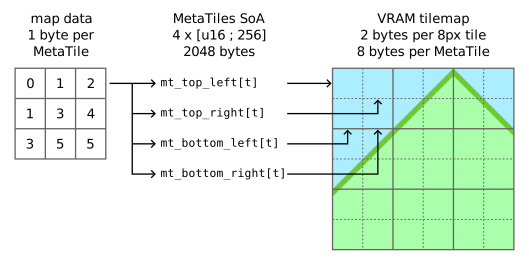
The metatile subsystem is responsible for:
- Tile collisions.
- Scrolling.
- Tile priority in the room layer.
- Changing room tiles in the middle of the screen.
- Interactive tile callbacks.
- Animated tiles. 32 8px tiles can be animated.
- Animated tiles have one limitation - the tile's palette cannot change.
- Crumbling tiles.
- Tiles that change after a delay and can optionally reappear after a different delay.
- The engine supports 2 different crumbling block chains per tileset.

The purple tinted tiles are the tile collision data. The dark purple tiles are unused.
I originally thought that 256 metatiles would be plenty for a game but I'm now realising that it's not. The sloped tiles require a lot more space than I expected and there is no way I have can fit 2 different floor, wall, and ceiling styles in a tileset while still having enough free tiles for decorations.
I am not going to increase the metatile count. The engine is designed for levels made up of small rooms, not big sprawling levels, and it's too late to easily expand the room data from 8-bits to 16-bits per room tile. I've decided that having multiple independent tilesets for each room type (gravity labs, offices, security, cargo, backrooms, etc) is better than having a large tileset that can combine multiple styles in a single screen.
Metatiles can be interactive. When an interactive entity hovers over and/or stands on an interactive metatile one or more of the following callbacks will be invoked:
PlayerOriginCollision- Called when the player is standing directly under the tile.PlayerLeftRightCollision- Called when the player is standing on the tile but not directly under the tile. It is only used by the crumbling tiles in Space Rescue Squad.PlayerAirCollision- Called when the player hovers over the tile.EntityCollision- Called when a non-player tile-interacting entity is standing on the tileEntityAirCollision- Called when a non-player tile-interacting entity is hovering on the tile.
Space Rescue Squad contains the following interactive tiles (source code):
PlayerScriptTrigger- Activates a bytecode script if the player touches or stands on the tile.PlayerActivateScriptTrigger- Activates a bytecode script if the player stands on the tile and the up button is pressed.Ladder- Changes the player's state to LADDER if up or down is held and a ladder-cooldown is 0. Also used to detect if the player is on a ladder when the player is in the LADDER state.CrumblingTiles_A- Activates a crumbling block chain (changing the tile and queuing a delayed tile write) when a player or enemy stands on it.CrumblingTiles_A_PlayerOnly- Same asCrumblingTiles_A, except it ignores enemies.UpGravity- If the entity has down-gravity: it sets the up-gravitymovementStateflag, clears the standing flag and plays a sound effect.DownGravity- If the entity has up-gravity: it clears the up-gravitymovementStateflag, clears the standing flag and plays a sound effect.
Rooms
The room subsystem is where the entities (with their metasprites) and the metatiles (with their tile collisions and interactive tile callbacks) meet. It also contains a simple bytecode scripting system to manage room events and script triggers.

The tile collision layer is hidden.
To greatly simplify the engine, each room is completely independent from each other. Whenever a room loads all subsystems are reset, the scene is decompressed and the room starts.
Rooms can have multiple entrances to allow for backtracking or complex maps. Each entrance also sets the player's orientation (facing direction and gravity) to orientate the player away from the door.
The load-room command and the save system require a room ID and entrance ID to minimise the amount of state saved across room loads.
Room entities have a spawn parameter byte to allow for custom spawning behaviour. At the moment these are magic numbers but I intend to add enums to the editor to turn the magic numbers into a dropdown combo box. Space Rescue Squad uses the following spawn parameters:
- Cleaning bots: 0=left, 1=right, 2=up-left, 3=up-right
- Jumping enemies: 0=down gravity, 1=up gravity
- Fish: distance to move before turning around
- Crew Rescued: 0 = top line, 1 = bottom line
Room entities must be placed inside a room group and are not spawned by default. Room scripts are responsible for spawning entity groups - creating an easy (if unused) way to conditionally spawn enemies (i.e. hidden until power is restored) or spawn enemies via a script trigger (i.e. hit a dead end and enemies appear behind the player). Unfortunate this also means I need to create a start-up script for each room that spawns the "always active" enemies.
A major advantage of my custom editor is that it highlights invalid tiles that will cause issues with sloped tiles. My tile collision subsystem requires an empty tile above a slope tile, an end-slope tile after a slope tile, and a solid or end-slope tiles under a slope tile. If these requirements are not met an entity can fall through the slope, zip up the slope or get stuck on a slope.

While my GUI looks interesting, it is lacking features that you would normally expect. I do not have any cut, copy, or paste functionality. I can duplicate room tiles using the "place tiles" cursor, which allows me to place the previously selected metatile, selected room tiles or scratchpad tiles. I cannot do the same to entities, entrances, or script triggers. Recreating each door entrance, script trigger and script was annoying, but significantly less annoying than adding a clipboard to my editor.
Bytecode scripting
Room events are handled by bytecode, inspired by the Bytecode chapter of Game Programming Patterns by Robert Nystrom. However, I did not implement a stack or register VM. My engine's bytecode works exclusively on gamestate unsigned 16-bit words, boolean flags and literal values. Rooms can have temporary variables that are placed after the global gamestate variables and are reset to 0 on every room load.
There are 3 types of bytecode instructions:
- Conditional instructions that can compare a gamestate word or flag with a
literal value.
- No conditional instructions are currently used in Space Rescue Squad.
- The conditional instructions were intended to be used to spawn different entity groups in a room based on the game state. For example, a room that does not contain any enemies until power is restored in a different section of the ship.
- Normal instructions that process the instruction and then execute the next instruction.
- Yielding instructions that will execute their instruction across multiple
frames.
- Examples include: delays, modifying the map over multiple frames, sleeping until all enemies are defeated (unimplemented), sleeping until a specific enemy is defeated (unimplemented).
- To prevent CPU hungry loops causing lag, while loops must contain a yielding instruction.
Game projects can define their own normal or yielding instructions in the GUI. The resources compiler will generate assembly code to build a function table for all the bytecode's opcodes.
As suggested by Game Programming Patterns, the bytecode is built using a GUI to make it harder to create invalid programs. I'm not sure if the bytecode GUI was a good idea or not. On one hand it a lot easier to select a bytecode instruction using a drop down list. On the other hand, the GUI lacks cut, copy, and paste functionality required to duplicate scripts across rooms.

Some of the bytecode instructions used in Space Rescue Squad include:
Spawn_Entity_Group- Spawns a single group of entities.- Spawns one entity per frame (to minimise lag) if invoked outside the startup script.
Load_Room- Fades out the screen and loads a new room.- Used for doors
Crew_Rescued- Starts the "CREW RESCUED" level end scene.- "CREW" and "RESCUED" are two separate entities as I could not fit the whole thing in a single metasprite.
- The "CREW" sprite changes the player's
Processfunction to one that has no controller inputs and plays the victory music.
Clear_Map_Horizontal- Takes a room tile position and length (as raw numbers - the editor doesn't support tagged room cells yet) and clears one room tile per frame from left to right.- Used at the end of the second level to disable an up-gravity generator.
- I intend to create a
Clear_Map_Verticalinstruction for unlocking doors.
Space Rescue Squad contains the following gamestate words, which can also be
modified by bytecode scripts using Set_Word, Increment_Word,
Decrement_Word, Add_To_Word or Subtract_From_Word instructions.
levelNumber- the current levelplayerHealth- the player's current shield valuewaterPosition- the height of the water in WaterRoom scenes
Scripts can be activated by script triggers, bounding-box of room tiles that will start a script if an entity activates the trigger. These triggers are not tested once per frame. Instead, an interactive metatile is responsible for activating the script trigger, which gives me more control over the script and allow me to easily create bytecode scripts that can be activated by button presses (doors) or enemies (unimplemented).
Script triggers that have the Once tick box checked can only be started once per room and will be removed after the script starts. The script trigger will reappear if the room is reloaded.

Startup script:
    Spawn_Entity_Group init


door:
    Load_Room a1d_tower, top


level_complete:
    Crew_Rescued
The door script is activated by a
PlayerActivateScriptTrigger tile and
will load the previous room.The level_complete script is activated by
PlayerScriptTrigger tile and
will spawn the "CREW RESCUED" sprites.
While the scripting system in the engine is simple, it is versatile enough to handle all of my needs for Space Rescue Squad.
Closing thoughts
It turns out my engine is more complicated than I originally thought when I started this postmortem.
While developing the game, I did notice a few issues with the engine and have come up with a few improvements I want to make to the engine:
- Change the entity tile collision box to a symmetrical box
stored in the entity struct (to match unnamed-snes-game's tile box).
- A fixed and symmetrical collision box will prevent the tile box from clipping into a solid tile when the entity's metasprite frame or gravity changes.
- Saves 2 bytes of ROM data from every metasprite frame.
- Entity code can still resize their collision box, preferably after testing if the new box will not clip into a solid tile.
- Simplify the sprite importer to remove the unused options and settings.
- Add enum support to entity spawn parameter bytes to remove the magic numbers from the rooms.
- Add more bytecode parameter types (including named tiles, named entities, and an immediate u8 byte).
- Tweak the entity activation and deactivation windows.
- I think the enemies are activating too early but never changed it during the game jam.
- Deactivated enemies can clump together I end with multiple overlapping enemies when they are reactivated.
- A table that displays the individual resource sizes so I have a better estimation of the final game ROM size.
- Allow scenes to manually change the metatile and palette frame. Intended for room events that can reverse or pause the metatile and/or palette animation.
- (unsure) Change the small map size to 32 tiles tall.
- (unsure) Preloaded metasprites for player projectiles.
- (unsure) Room overlays (patches?) that allow scripts to replace a section of
room tiles.
I'm thinking of having a section of bridge that is destroyed when the player backtracks into the previous room. Something similar to the orbs that remove obstacles in Illusion of Gaia or the pit that appears in a cutscene in the first town of Secret of Mana.
When Space Rescue Squad is complete I'm going to retire the engine. While a lot of the components are useful, they are too tightly integrated together to be used in other games. I may reuse some of the data structures and code patterns in future projects tho.
In part 2 of this postmortem, I will talk about the jam and the game.